Posts

Diskless Workstations Advantage and Disadvantages
Image
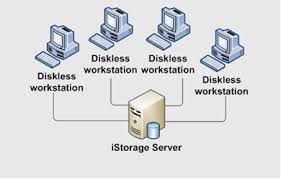
A diskless workstation or PC on a local-area network (LAN) is a computer system that does not have its own disk. Instead, it stores files on a network file server. This type of system uses network booting to load the operating system, but it does contain its own main components including the CPU, RAM, video, sound and network adapter (see "workstation" for a description of common components). Diskless workstations can reduce the overall cost of a LAN because one large-capacity disk drive is usually less expensive than several low-capacity drives. In addition, diskless workstations can simplify backups and security because all files are in one place -- on the file server. Also, accessing data from a large remote file server is often faster than accessing data from a small local storage device. One disadvantage of diskless workstations, however, is that they are useless if the network fails. Advantages of Diskless Setup Significantly reduce initial capital and implementation co...

Installing Network Printer to Windows Server 2012 Essentials

Image
Section 1 – Prerequisites Go to your vendor’s web site and download the appropriate x86 and x64 print drivers. For my needs, I downloaded the drivers for Windows 7 (32bit) and Windows 2012 (64 bit). Next, extract the driver files to subfolders. In my case, the HP files I downloaded are self-extracting files. But be sure you uncheck the option to run the install immediately after extracting the files. Finally, before proceeding, make sure you know the IP address of your network printer. Section 2 – Add the Network Printer Go to Control Panel –> View Devices and Printers (under Hardware) Click on Add a Printer. It will scan for new printers, and we should expect that it will not find any.  Click on The printer that I want isn’t listed link. On the next screen, click on the Add a local or network printer as an administrator link. The scan will run again, and (again) we will click on The printer that I want isn’t listed link. Select the Add a printer using a TCP/IP address or hostna...

Managing user accounts in Windows Server 2012

Image
The Windows Server 2012  Dashboard provides a simple and user-friendly interface for managing user accounts. To add a user account to Windows Server 2012 , perform the following steps: Open the Dashboard. Click Users on the navigation bar. Click Add a user account in the Tasks pane. Follow the prompts in the Add a User Account Wizard to create the user account. To remove a user account from Windows Server 2012 , perform the following steps: Open the Dashboard. Click Users on the navigation bar. Select the user account that you wish to remove. In the Tasks pane, click Remove the user account. Follow the prompts in the Delete a User Account Wizard to remove the user account. The wizard  provides the option to delete files associated with the user, including the user's redirected folder  and  File History backups, when the account is deleted. To retain these files on the server, make sure the corresponding box is unchecked.

Windows Server 2012

Image
Windows Server 2012: A Short Introduction A customer of ours recently called to discuss the release of the new Windows Server 2012 edition (called Server 8 in pre-release guises), due out later this year. His questions were focused on the expected impact such a release would have and whether Microsoft’s marketing hype that it would ‘redefine‘ the server OS category was kosher. Rewind back to 2008 and the release of the first Crucial VPS’s in Australia. We offered the then new Windows Server 2008 on our new to market Windows VPS. Server 2008 replaced the long-standing and widely used Server 2003 and utilised Windows Longhorn architecture, this release was seen as an evolution in terms of non-Unix server OS releases. Windows Server 2008 R2 soon followed and was built on the Windows NT 6.1 core, the same OS core used on the new desktop version of Windows called ‘7’, which was released in October 2009. Windows Server R2 introduced many improved features and enhancements including new funct...

How to fix update isn't applicable to your device error in Windows 10

When you're attempting to update your Windows installation to the latest version you may come across this error if you're trying to install the software remotely from bootable media, such as a USB drive. This will usually happen if the current version of Windows that you're running hasn't been fully updated yet. To make sure that you're running the latest possible version of Windows for your machine you'll have to check for any Windows Updates and download any that are available. This should happen automatically but we'll show you how to get there manually too. Head down to your search bar at the bottom left of your screen, and type in 'Windows Update'. Select the top search result, and a window will appear. At the top of this window, there will be a 'Check for Updates' button. Click this button and Windows will manually check if there are any updates available for your machine. If there are updates ready to be downloaded or installed, comple...

How to Fix the Most Common Problems With LCD Monitors

Image
Most Common Problems With LCD Monitors Computer monitors are fairly simple, in use if not in actual construction: plug ’em in, turn ’em on, look at your computer stuff on the brighter part. But misleadingly easy as they might seem, there’s a lot of stuff going on inside that blank plastic case…and a lot of stuff that can go wrong. Unfortunately, most of that stuff requires either a certified repair or a complete replacement to fix. Unless you’re especially handy with electronics and you just happen to have access to cheap replacement parts, it’s usually better to either return a monitor to the manufacturer (if it’s under warranty) or simply buy a new one. Even so, here are the most common ailments for modern LCD monitors, and what can be done to fix them…or not. Stuttering or Flickering If your monitor’s screen is often flashing or stuttering, there are a few different problems that you could be facing. It might be something as simple as a loose or faulty video cable. So first, tighten...

Reset your Windows 10 local account password

Image
If you forgot your Microsoft account password, follow these steps . If you don’t have a Microsoft account and forgot your local account password, you can’t recover it. Instead, you’ll need to reset your PC. Note: If you’re using Windows 10, version 1803, and added security questions to your local account to help you reset your password, select Reset password on the sign-in screen. (This link appears after you enter an incorrect password.) Then enter the answers to the security questions and choose a new password. Warning: Following these steps will remove all of your data, programs, and settings. 1.Start your PC and select the Power  icon in the bottom right-hand corner of the lock screen. 2.While holding down the Shift key, select Restart. 3.On the Boot options menu, select Troubleshoot > Reset this PC > Remove everything. 4.Your PC will restart and will reset itself.

SSD vs HDD

Image
Most people now buy laptops for their computing needs and have to make the decision between getting either a Solid State Drive (SSD) or Hard Disk Drive (HDD) as the storage component.  So which of the two is the better choice, an SSD or HDD? There’s no straight-forward answer to this question; each buyer has different needs and you have to evaluate the decision based on those needs, your preferences, and of course budget. Even though the price of SSDs has been falling, the price per gigabyte advantage is still strongly with HDDs. Yet, if performance and fast bootup is your primary consideration and money is secondary, then SSD is the way to go. For the remainder of this article, we will make a comparison of SSD and HDD storage and go over the good, the bad, and the ugly of both. What is an SSD? We’ll make no assumptions here and keep this article on a level that anyone can understand. You might be shopping for a computer and simply wondering what the heck SSD actually means? To beg...

What Is a VPN, and Why Would I Need One?

Image
A VPN, or Virtual Private Network, allows you to create a secure connection to another network over the Internet. VPNs can be used to access region-restricted websites, shield your browsing activity from prying eyes on public Wi-Fi, and more. These days VPNs are really popular, but not for the reasons they were originally created. They originally were just a way to connect business networks together securely over the internet or allow you to access a business network from home. VPNs essentially forward all your network traffic to the network, which is where the benefits – like accessing local network resources remotely and bypassing Internet censorship – all come from. Most operating systems have integrated VPN support. What Is a VPN and How Does It Help Me? In very simple terms, a VPN connects your PC, smartphone, or tablet to another computer (called a server) somewhere on the internet, and allows you to browse the internet using that computer’s internet connection. So if that server...

How to Recover Lost Product Key

Image
Have you lost your Microsoft product key? What if Windows can no longer start due to a blue screen or other error, then you may need to reinstall the operating system. To do so, you must have access to a product key (CD Key). But if you can no longer find the product key, you would lose your Windows license. With KeyFinder Plus you could easily retrieve product keys for Windows, Office, SQL Server, Exchange Server and Adobe Acrobat, even if you can't boot your computer into Windows! No other product can recover product keys from non-booting Windows installations. This article explains how you can recover lost product keys (CD Key) from your local, remote or crashed computer especially when you need to reinstall Windows but can't find your product key. 1.Download and Install KeyFinder Plus Click here to download the setup package of KeyFinder Plus and save it in a place that is easy to find, such as your PC desktop. When the download is complete, double-click the download fi...

How to find a MAC address

Image
Follow these instructions if you need to find your computer's Media Access Control address (MAC address). It is the unique identifier of a network adapter.  The MAC address is a 6-digit hexadecimal number, which is normally written as a twelve character alphanumeric string with a colon (:) or other separating character after every second character: Example of a MAC address:  00:00:00:a1:2b:cc If you computer has more than one network adapter (for example, an ethernet adapter and a wireless adapter), it will have a different MAC address for each adapter. To find the MAC address: Windows Vista, Windows 7: Click the Start button. In the Run text box, type cmd.  This will open the command window. At the command prompt, type ipconfig /all. Copy down the "Physical Address" (aka the MAC address) from the "Ethernet adapter Wireless Network Connection" section. Close the command prompt window. Windows 2000, 2003, XP, NT: Click Start > Run. In the Run text box, type cm...

Two kinds of Ethernet cables Straight Through and Crossover

Image
STRAIGHT THROUGH Ethernet cables are the standard cable used for almost all purposes, and are often called "patch cables". It is highly recommend you duplicate the color order as shown on the picture. Note how the green pair is not side-by-side as are all the other pairs. This configuration allows for longer wire runs. CROSSOVER CABLES  The purpose of a Crossover Ethernet cable is to directly connect one computer to another computer (or device) without going through a router, switch or hub.

Steps on How to Backup and Delete Logs

Image
For FS800U Need to put the USB Connector and USB FLASH DRIVE to the Biometric Machine (FS800U) If the biometric have ADMIN, need admin to log in the biometrics Go toPen drive Click OK DOWNLOAD ATTLOGS and DOWNLOAD USERS will appear Click the DOWNLOAD ATTLOGS After you click the DOWNLOAD LOGS, Successful message will appear after you downloads logs is DONE You can now check your file in the computer. If the file is complete you can now delete the logs. DONE For FS800 You need to LOG IN the FSDM7 OR T4 After you log in, go toTRANSFER LOGS Click OK Date Range will appear Select the date and year you backup Note: You may select the year and date in the back up but if you are delete no  daterange appears, in short if you delete, all the logs will deleted. Click OK Right theFILE NAMEandLOCATIONyou save. Check your back up logs first if it is complete before you delete DONE S teps on How to Delete Attlogs from the Biometrics If the biometric have ADMIN , need admin to log in the biome...

Download Windows Media Player 12 for Windows 7, Vista & XP

Image
Download Windows Media Player 12 for Windows 7, Vista & XP Windows Media Player 12 is not officially available but you can download it as a beta version to get the preview of all its upcoming features. The Player 12 version would be offered as a combo in Windows 7 Operating System.You can also download the Windows Media Player 12 skins for Windows Vista & Windows XP if you want to get the same looks on your OS without installing the beta version. This version of WMP is quite better than the version 11 because there are many changes made to the buttons and navigation. The player comes with two different player modes called as ‘Playing View’ & ‘Library View’. Library view contains all the library manipulation features that should be familiar from WMP11. Now Playing view contains the current playlist, visualizations, and videos. After making some searches i found that there was a download link available online, you can try it out and check out the players features. ...

Find Website Loading Time with Pingdom Tools

Image
Find Website Loading Time with Pingdom Tools Google has hinted that if you want to make your website rank in the top then you need to make sure that its loading time is reduced. This is because Google wants to make sure that all the websites listed on the Search Result Pages would load real quick, hence here is a Online Tool offered by a company which offers website monitoring service and which can be tried here . The tool would need you to Enter any website or webpage URL in order to get started after which it would load it completely and give you the stats. You can even try out the Google Page Speed Tool which works similarly giving you some suggestions on how to reduce the load time. It basically works by loading the total HTML Page which includes all its objects like Text, Images, CSS Files, JavaScript Codes, RSS, Flash Files , Frames/iFrames etc and then give a detailed report which would have complete details on how much time each of the above mentioned individual objects w...

Build Social Networking Site like Orkut – Dolphin Review

Image
Build Social Networking Site like Orkut – Dolphin Review Orkut is pretty big atleast in India because of the Interface and the looks and everything which is why i have seen that the Generation Y still does not want to move to either Twitter or Facebook and still stick to Orkut. Well on the same thoughts i thought of building a new Community for Patels – which is our community where people all over the world can join and stay connected. Along with this in the long run we can even set up matrimonial options, payments for premium members and also charge the members to get access to others private details for the matrimony system. The search for a good script didnt take much time because the one which i found was called as Dolphin offered by Boonex . The script is so powerful that it offers a single package for creating your own Social Network, Web Community, Dating Site, Matrimonial Website which comes with options like Friends, Chat, Messenger, Video, Music, Groups, Communities, Cla...

How to Lock any Folder Without using any software?

Image
How to Lock any Folder Without using any software? You might be wondering that How any folder can be locked without using any software like Folder Lock, File Lock, etc. People want to lock the folders that they do not want to share with others or they do not want others view the contents inside the folder. So if you also want to lock a folder which you don't want others to see, you have to read this post carefully and follow the steps given. So now if you are ready to lock a folder , follow these steps : First of all open a blank Notepad document. To open a blank Notepad document go to Start Menu >>> All Programs >>> Accesories >>> Notepad . Copy this entire code given below and paste it there. Now replace " type your password here " with a password with wich you want your folder to be protected. Now you can save your notepad file with the name " locker.bat ".To do this go to File menu >>> Save As... >>...

How to Fix Low Virtual Memory Error in Windows

Image
Generally when you install/run very big applications like 3DMax, Adobe Photoshop or Macromedia Dreamweaver the windows based PC’s start giving you a error message saying – Your system is low on virtual memory. To ensure that Windows runs properly, increase the size of your virtual memory paging file. Reasons for Low Virtual Memory : Lets say you are running a application like Adobe Photoshop and while you are rendering a big sized image the pc starts using high amount of RAM and when there isn’t any adequate Random Access Memory on your PC which can handle processing of this data. This is when the PC starts using the Virtual Memory. What is Virtual Memory : Temporary storage used by a computer to run programs that need more memory than it has. For example, programs could have access to 4 gigabytes of virtual memory on a computer’s hard drive, even if the computer has only 32 megabytes of RAM. The program data that does not currently fit in the computer’s memory is saved i...

Micromax W900 Price and Features

Image
The new Micromax W900, which has earned a great success in the Indian market, is a touch screen mobile with impressive features like 2.0 Mega pixel CMOS camera, Bluetooth, Wi-fi, Multi Format Music Player, in-built GPS, pre-loaded Windows mobile OS and Video Player.This phone also has handwriting recognition feature. Micromax W900 is priced at Rs.7618/- and is available at leading stores. Some consumer catching features of it can be read as below: Microsoft Windows Mobile 6.5 Professional Voice Assisted GPS Navigation 3.2″ Touch screen with handwriting recognition 2.0 Mega pixel CMOS camera with Flashlight Microsoft Office The best feature of this phone is its operating system. It runs Microsoft Windows which makes it easier for the user to open and view his/her Microsoft Office based documents, spreadsheets, tables, powerpoint presentations, etc. This phone also has a 3.2″ big touch screen which makes it a fun for the user to operate it. Writing tasks are made more easier by adding ...

Apple QuickTime Pro V7.6.6 Build 1671 + License

Image
Watch movies on iPhone, iPod, or Apple TV? Save your favorite movie trailers on your computer to watch over and over again? Create compelling slideshows—complete with a soundtrack? Record video and share it with friends and family? You can do all of that — and much more — with QuickTime 7 Pro. Available for Mac OS X and Windows, QuickTime 7 Pro offers a perfect solution for anyone who enjoys watching, recording, creating or sharing high-quality multimedia. • Convert Your Media Want to watch your home movies on the go or in your living room? QuickTime 7 Pro allows you to easily export any file playable in QuickTime Player to a format optimized for iPhone, iPod, Apple TV or a variety of other devices. Just open a movie in QuickTime 7 Pro, select Export from the File menu and choose your destination in the Export drop-down menu. A great way to create video podcasts! • Show the World QuickTime Pro allows you to easily prepare your content for distribution on the Internet. Use Export for ...